

Five Fixes That Cut No-Show Appointments Fast
Five actions move the no-show needle faster than anything else: multi-touch reminders with two-way confirmations, shorter lead times paired with self-scheduling, waitlist-driven backfill workflows, a clear cancellation policy backed by card-on-file enforcement, and a habit of measuring results and adjusting monthly. Clinics that run all five together typically see no-shows drop within a few weeks, and high-performing practices maintain relatively low no-show rates.
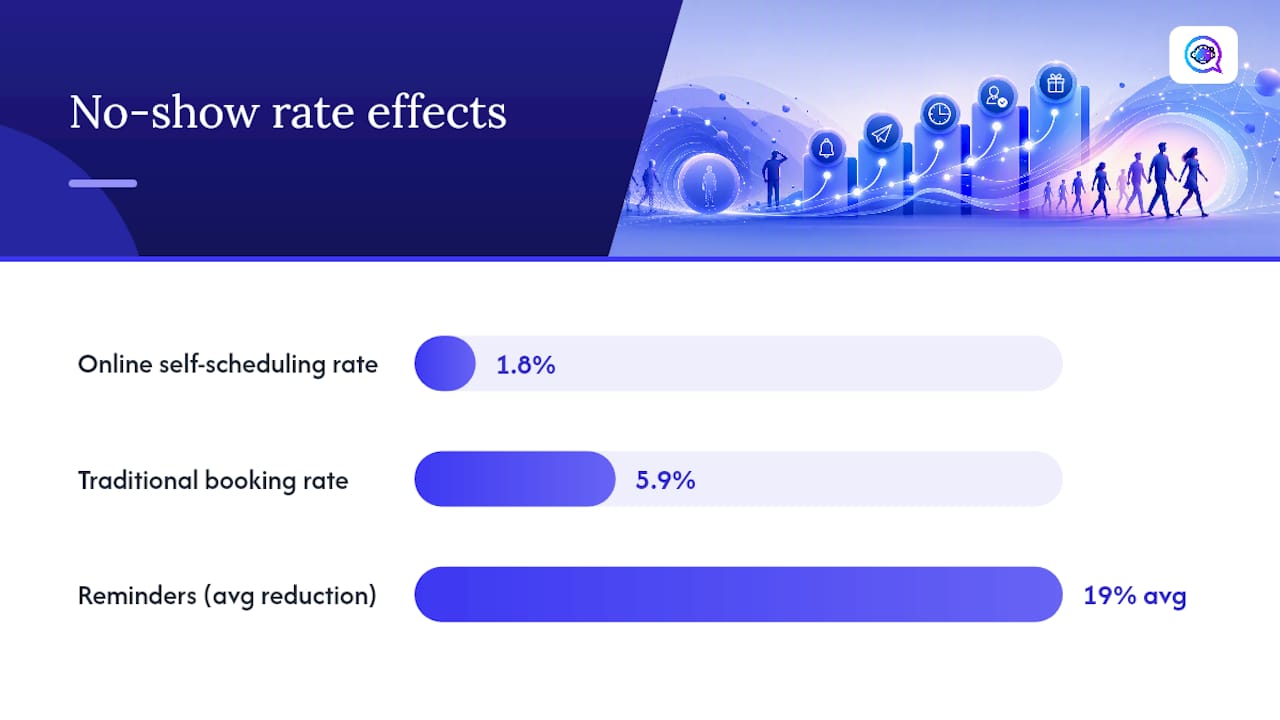
You don’t need to overhaul your whole scheduling system to see movement. A systematic review found that reminder calls alone reduced no-shows by about 19% on average, with 20 of the organizations studied seeing drops of 20% or more. That’s a meaningful swing for a change that costs almost nothing to implement.
Here’s the prioritized list, in the order that produces the fastest return:
Multi-touch reminders with two-way confirmation — SMS, email, and voice at staggered intervals, with a reply option that lets patients confirm or reschedule in one tap.
Shorter booking-to-appointment lead time — the longer a patient waits between booking and the visit, the more likely something else fills that slot in their head.
Waitlist and backfill automation — when a slot opens, the next eligible patient should hear about it within minutes, not days.
A clear, enforceable no-show policy — cancellation windows, late fees, and card-on-file terms stated up front, applied consistently.
Ongoing measurement and small experiments — track no-show rate by provider and visit type, then test one variable at a time.
Pro Tip: Start with reminders and lead-time reduction before touching your penalty policy. Fix the friction first. Punish the behavior second, if you still need to.
If you can only tackle two things this month, make it reminders with two-way confirmation and waitlist automation. Reminders catch the forgetful no-show. Waitlists catch the revenue you’d otherwise lose when someone cancels anyway.
Key Takeaways
Clinics that combine multi-touch reminders, shorter lead times, waitlist automation, and a clear no-show policy typically cut no-show rates within 8 to 12 weeks.
Point | Details |
|---|---|
Start with reminders | Multi-touch SMS, email, and voice reminders with two-way confirmation cut no-shows by an average of 19% in reviewed studies. |
Shorten booking-to-visit lead time | Online scheduling lowered no-show rates to 1.8% versus 5.9% for traditional bookings in one observational study. |
Automate your waitlist | Notify the next eligible patient within minutes of a cancellation instead of leaving the slot empty. |
Enforce policy with transparency | Pair a clear cancellation window and card-on-file terms with compassionate exceptions for documented barriers. |
Automate the follow-through with Astreaux | Astreaux handles two-way SMS, reschedule links, and waitlist notifications so front-desk staff aren’t managing reminders manually. |
How Do Reminders and Messaging Reduce No-Shows?
Reminders work because most no-shows aren’t defiance, they’re forgetfulness or a scheduling conflict that slipped a patient’s mind. The evidence backs this up clearly: reminder calls cut no-show rates by an average of 19% across the practices studied in that same systematic review, and text-based reminders often outperform phone calls or email alone because SMS carries higher open and read rates than either channel.
Timing matters as much as the message itself. A cadence that works for most outpatient practices looks like this:
Instant confirmation the moment the appointment is booked, so there’s no ambiguity about time or location.
48 to 72 hours out, a reminder with a one-tap reschedule link, giving patients enough runway to plan around it.
24 hours out, a firmer SMS reminder, since this window catches most last-minute conflicts before they become no-shows.
Same-day, morning-of, a short nudge for early appointments or high-risk visit types (first-time visits, procedures, mental health intake).
Two-way confirmation changes the math entirely. A reminder that only informs is passive. A reminder that asks “Reply YES to confirm or tap here to reschedule” turns a silent no-show into an active decision, and it gives your front desk a signal to act on days in advance instead of finding out at 9:00 AM that a slot is empty.
Here’s a template you can adapt for a 24-hour reminder:
For a same-day nudge, keep it shorter and more direct:
Personalization does real work here, too. A reminder that names the provider and states why the visit matters (“Your annual checkup helps us catch issues early”) tends to reduce the anxiety-driven avoidance that quietly drives a chunk of no-shows, particularly for behavioral health and first-time patients. Keep the wording plain and direct. Health literacy guidance consistently shows that simple, action-oriented phrasing beats clinical jargon for getting patients to actually act on a message.

Does Faster Scheduling Actually Cut No-Shows?
Yes, and the effect is larger than most clinic managers expect. The longer the gap between booking and the appointment date, the more likely a patient forgets, finds a conflict, or simply loses urgency. Shortening that lead time, and giving patients more control over booking, is one of the more underused levers in no-show prevention.
An observational study from a medical practice and university hospital found that online-booked appointments had a no-show rate of 1.8%, compared to 5.9% for appointments booked the traditional way. The same study reported that unused appointment slots dropped from 22.7% to 10.3% after the practice implemented online scheduling. That’s not a marginal improvement. That’s a practice recovering roughly one in eight appointment slots it was previously losing.
Here’s how to implement self-scheduling without creating new problems:
Offer mobile-first booking with a minimal number of required fields: name, phone, preferred contact channel, and reason for visit.
Capture a backup contact method at booking, since patients who only give an email often miss SMS-based reminders entirely.
Build in a same-day or next-day option wherever your clinical workflow allows it, even if it’s a smaller pool of slots than your standard calendar.
Route new or complex cases through triage rather than pure self-booking. Open-access scheduling works well for routine follow-ups but can create mismatches for patients who need a specific provider or visit type.
Offer a language toggle or interpreter note field at booking so non-English speakers aren’t quietly filtered out of the self-scheduling option.
The tradeoff worth watching: open-access scheduling reduces friction, but it can also let a patient book a visit type your clinic can’t actually deliver in that slot. Monitor same-day cancellation rates for self-booked appointments specifically, and if they spike, tighten the intake questions rather than removing the feature.
Telehealth deserves a mention here, too. For appropriate visit types, offering a virtual option removes the transportation and time barriers that cause a real share of no-shows, particularly for chronic condition check-ins that don’t require a physical exam.
What Front-Desk Workflows Keep Capacity High?
Reminders and scheduling design reduce how often no-shows happen. Operational workflows determine how much revenue you recover when they happen anyway. A cancellation you catch three days out is a rebooking opportunity. A cancellation you catch when the patient doesn’t walk in is a wasted slot.
The core tool here is an ASAP waitlist: a running list of patients who’ve asked to be notified if an earlier slot opens, a key benefit of clinic queue management for healthcare administrators. When a cancellation comes in, automated systems can text the next eligible patient on that list within minutes. Manual fallback still matters for patients without SMS access, so keep a phone-based backup process for that segment.
Waitlist-based backfill versus double-booking solves the same problem in two very different ways. Double-booking assumes a no-show will happen and stacks two patients into one slot, which works until both show up and your provider is now running two visits at once. Waitlist-driven backfill only fills a slot after a cancellation is confirmed, which protects the schedule without creating provider overload. Reserve double-booking for high-no-show segments you’ve already measured and confirmed, not as a default habit.
Pro Tip: Ask your waitlist patients for their earliest availability, not just “anytime.” A waitlist full of vague answers is nearly as useless as no waitlist at all.
Staff scripts matter more than most clinics give them credit for. Here’s a simple flow for a cancellation call:
Confirm the cancellation and ask if the patient wants to reschedule on the spot.
Offer the two nearest available slots rather than asking “when works for you,” which tends to stall the conversation.
If they decline, ask one open-ended question about the reason (transportation, cost, scheduling conflict) and log it.
Tag the record for follow-up: transportation assistance, community health worker referral, or a simple reminder-frequency adjustment.
Notify the next waitlist patient immediately if the vacated slot fits their stated availability.
That reason-logging step is easy to skip under time pressure, but it’s the piece that turns individual cancellations into a pattern you can actually fix. If half your logged no-shows this quarter cite transportation, that’s a targeted intervention (transit vouchers, telehealth offers) rather than a blanket policy change.
How Should Clinics Write and Enforce a No-Show Policy?
A no-show policy earns patient buy-in when it’s specific, consistently applied, and paired with real alternatives, not when it’s punitive for its own sake. The goal isn’t to penalize patients. It’s to make the cost of missing an appointment clear enough that people plan around it.
Here’s sample policy language you can adapt:
Notice what that language does: it defines the window precisely, states the consequence, and immediately offers a way out before penalty becomes the story. Fees alone rarely fix the underlying behavior. Reminders address forgetfulness; fees address indifference. Most clinics need both, but reminders should come first because they’re free and they catch a larger share of the problem. Layered frameworks that start with confirmation and 24-hour SMS reminders before adding financial mechanisms tend to see better results than jumping straight to fees.
Card-on-file makes enforcement actually workable instead of theoretical. Without it, a no-show fee is a line item nobody collects. With it, transparency at booking (“A card is required to hold this appointment; late cancellations may incur a $25 fee”) sets the expectation before the visit rather than after.
Pro Tip: Make rescheduling easier than canceling outright. A one-tap reschedule link removes the friction that causes patients to just not show up instead of calling to change the date.
Equity has to be part of this conversation. A policy applied without exception to a patient who missed a visit because their childcare fell through, or because they had no way to get to your clinic, isn’t fairness, it’s a blunt instrument. Build a documented exception process: a note field for transportation or caregiving barriers, and a supervisor override for repeat cases tied to a specific, verifiable hardship. That protects your revenue model without alienating the patients who need your care the most.
What Metrics Actually Predict No-Show Risk?
You can’t fix what you don’t measure by segment. A clinic-wide no-show rate of 12% might hide a Monday-morning rate of 22% and a Wednesday-afternoon rate of 6%, and those two problems need completely different solutions.
Track these metrics weekly at minimum:
No-show rate, broken out by provider, day of week, and visit type.
Confirmed versus canceled versus unconfirmed, tracked separately rather than lumped into one “didn’t show” bucket.
Fill rate for canceled slots, which tells you whether your waitlist workflow is actually working.
Time from booking to appointment, since longer lead times correlate strongly with higher no-show risk.
A simple tracking table looks like this:
Segmentation reveals where to focus. New patients, adolescent visits, and appointments booked more than two weeks out tend to carry higher no-show risk across most outpatient settings, and payer type sometimes correlates too, since transportation and work schedule flexibility vary widely across patient populations. Once you’ve identified your highest-risk segment, target it specifically instead of applying a one-size-fits-all reminder cadence to everyone.
Run small experiments rather than overhauling everything at once. Pick one variable: reminder timing (24 hours versus 48 hours), message wording (informational versus motivational), or self-scheduling UI friction (five fields versus two). Split your patient population, run each version for four to six weeks, and compare no-show rates for a large enough sample that the difference isn’t just noise. Even a modest test group of 100 to 150 appointments per arm is usually enough to spot a meaningful shift if one exists.
What Does Automated No-Show Prevention Look Like in Practice?
The clinic layered in three changes over about ten weeks: multi-touch reminders across SMS and email, two-way confirmation replies, and automated waitlist notifications for canceled slots. No-shows dropped meaningfully within that window, tracking closely with what the reminder-call research and online-scheduling data would predict for a practice starting from a similarly high baseline.
The features that mattered most weren’t exotic. They were the boring, reliable ones: two-way SMS that let patients confirm or reschedule without a phone call, one-click reschedule links that didn’t require downloading an app, and card-on-file capture integrated directly into the booking flow. Automated reminder systems also reduce administrative load compared to manual calling, freeing front-desk staff to handle the patients who actually need a human conversation, like the ones flagged for transportation barriers.
A quick note on data handling matters here, too. Any automated reminder system touching protected health information needs explicit patient consent for SMS communication, secure integration with your practice management system, and a documented opt-out path. Staff training should cover not just how the tool works but what to do when a patient replies with a clinical question instead of a scheduling one. Astreaux’s guide to AI appointment setting walks through how conversational automation handles two-way confirmation and reschedule flows without adding staff overhead, which is the operational core of what made this kind of turnaround possible.
Your Week-by-Week Rollout Plan
You don’t need a year-long project plan for this. Most of the tactics above can be sequenced into a 12-week rollout that produces measurable results well before you hit the finish line.
Week 0: Establish your baseline. Pull no-show rate by provider, day, and visit type for the past 90 days before changing anything.
Weeks 1 to 2: Deploy multi-touch reminders (instant confirmation, 48 to 72 hour, and 24 hour SMS) with two-way confirmation replies.
Weeks 3 to 6: Add self-scheduling for routine visit types and stand up your ASAP waitlist workflow with automated notifications.
Weeks 7 to 12: Introduce or tighten your no-show policy, add card-on-file capture at booking, and start measuring fill rate and lead-time trends against your baseline.
Copy-ready scripts make this move faster. For a reschedule SMS after a missed appointment:
For a front-desk phone script calling an unconfirmed patient the morning of:
For policy text displayed at the point of booking:
Pro Tip: Before going live, send yourself a test reminder from a personal phone number and click every link. Broken reschedule links are one of the most common, and most avoidable, reasons automated reminder systems underperform.
Run a short QA pass before full deployment: confirm SMS delivery timing lands within the intended window, verify reschedule links route to the correct calendar, and check that confirmation replies actually log into your system instead of disappearing into an unmonitored inbox.
A Practice Manager’s Honest Rollout Notes
The first month of this kind of rollout is messier than any checklist makes it sound. When we prioritized reminders and two-way confirmation first, front-desk staff spent the initial period fielding confused replies from patients who’d never gotten a text from the clinic before. That’s normal. It settles once patients learn what the messages mean and that a reply actually does something.
The non-obvious trick that helped most: assign one staff member each morning to scan overnight confirmation replies before the day starts, rather than letting them queue up in a shared inbox nobody owns. This change helped the front desk anticipate same-day no-shows earlier in the day.
Waitlist automation paid off faster than expected, but only after we told patients upfront, at booking, that a waitlist option existed. Nobody signs up for something they don’t know is offered. Once that changed, our fill rate on same-day cancellations roughly doubled within a month, which tracked with what the measurement framework above would predict: small, targeted fixes compound faster than one big policy change.
If you’re rolling this out yourself, don’t wait for a perfect system before starting. Ship the reminders first. Everything else layers on top of that foundation.
How Astreaux Automates the Hardest Part of This Plan
Every tactic above works better with less manual effort behind it, and that’s exactly where automation earns its keep. Astreaux handles the two-way SMS confirmations, one-click reschedule links, and waitlist notifications that this article recommends running from week one, without requiring your front desk to manually text every unconfirmed patient by hand.

The mapping is direct: Astreaux’s conversational AI manages the reminder cadence and confirmation replies from Section 2, supports the self-scheduling and mobile booking flow from Section 3, and automates the backfill notifications your waitlist depends on in Section 4. Card-on-file workflows and pipeline analytics round out the policy and measurement pieces, so you’re not stitching together three separate tools to run one coherent no-show strategy.
Getting started typically takes a short onboarding window: connect your practice management or CRM system, let Astreaux learn your clinic’s voice and messaging tone from a handful of sample conversations, and set your reminder cadence to match the 48-hour and 24-hour windows outlined earlier. Astreaux integrates with over 7,000 apps, so most practices don’t need to rebuild their existing scheduling stack to add automated reminders and confirmations on top of it.
If you’re evaluating automation for a therapy practice specifically, the intake automation guide for therapists covers pre-visit forms and scheduling workflows tailored to behavioral health, where no-show rates tend to run higher than average. For clinics ready to see the platform directly, Astreaux’s lead outreach and scheduling automation is the place to start a trial and map your own reminder cadence against the framework in this article.
Sources
These sources back the specific recommendations above and are worth bookmarking if you want to dig deeper into the underlying research:
Reducing Appointment No-Shows: Going from Theory to Practice - PMC
Efficient patient care in the digital age: impact of online appointment scheduling in a medical practice and a university hospital on the “no-show”-rate (Frontiers)
Telehealth
How to Reduce No-Shows: The Complete Guide | NoShowCalc
FAQ
How Do You Professionally Say “No Show” to a Patient?
Use neutral, non-judgmental language like “we weren’t able to see you for your scheduled visit” rather than accusatory phrasing, and follow it immediately with a rescheduling option.
What Happens if a Patient Doesn’t Show Up to a Doctor’s Appointment?
Most practices log it as a no-show, may apply a fee under their stated policy if a card is on file, and typically flag the record for follow-up outreach to reschedule.
What Is the Average No-Show Rate for Doctor Appointments?
No-show rates vary widely by specialty and setting, but practices using online self-scheduling have reported no-show rates as low as 1.8%, compared to nearly 5.9% for traditional phone-booked appointments.
What Counts as a Valid Reason for Missing an Appointment?
Documented barriers like transportation breakdowns, sudden illness, or childcare emergencies are commonly accepted as valid reasons, and clinics should build an exception process for these into their no-show policy rather than applying fees automatically.
Can Automation Really Reduce No-Shows Without Feeling Impersonal?
Yes, when the messaging is personalized and two-way. Tools like Astreaux train on a clinic’s own voice so reminders read as genuinely coming from the practice, not a generic automated blast.