


Ship Click-to-SMS in 5 Minutes: Developer Steps and U.S. Consent
Add a click-to-SMS link by using an anchor with the sms: URI and, if you want a prefilled message, append a URL-encoded body parameter. Tapping the link opens the visitor’s default messaging app with your number (and optional message) ready to go, but the visitor still has to hit send. We’ll walk through copy-paste examples below, then cover the consent rules you need before you treat that click as anything more than a conversation starter.
TL;DR:
Prefilling a message should be kept under 100 characters to avoid truncation issues on some Android devices.
Testing the link across various devices and messaging apps is essential due to differences in protocol handling and parsing.
A click-to-SMS link alone does not constitute legal marketing consent; clear disclosures and explicit opt-in are mandatory before automated follow-up.
Placing the link on contact or booking pages and making it accessible and visually clear improves user engagement and conversions.
Use a short redirect URL for printed materials or QR codes to maintain trackability and avoid exposing complex
sms:URIs.
AstreauxTurn More Conversations Into BookingsAstreaux helps service professionals respond to leads instantly, schedule appointments, and nurture qualified prospects through conversational AI.Book a call
What is a click-to-SMS link and how does the SMS URI work?
A click-to-SMS link, sometimes called an SMS URL or click-to-text link, is an HTML anchor that uses the sms: scheme instead of http: or mailto:. The URI scheme is the part before the colon, and it tells the browser which protocol handler should take over. For sms:, that handler is the device’s default messaging app.
Here’s what matters for anyone building one:
The link opens a draft message, not a sent one; the visitor must tap send themselves.
The
sms:scheme works likemailto:in that it hands off control to another app entirely.Behavior can vary slightly by phone and carrier, which is why testing across devices matters.
Adding a prefilled message requires a
?body=parameter, and that text must be URL-encoded or it can break.
Because the browser is just passing data to a protocol handler, any punctuation, spaces, or special characters in your prefilled text need proper encoding. Skip that step and you risk a broken link or a garbled message on the other end.
How do you build a click-to-text button, step by step?
Start simple, then layer in the details that make the link reliable across devices.
Write the basic anchor. A plain click-to-text link looks like this:
<a href="sms:+15551234567">Text us</a>. Use the full number with country code and no spaces or dashes inside the href, per Google’s deep link guidance.Add a prefilled message. Append
?body=followed by your URL-encoded text:<a href="sms:+15551234567?body=I%27d%20like%20to%20book%20an%20estimate">Text us</a>. Notice the apostrophe becomes%27and each space becomes%20. Google’s documentation confirms the href is treated as data passed straight to the protocol handler, so encoding isn’t optional.Make it an accessible button. Wrap the anchor in button styling but keep it a real
<a>tag, add a visible label, and includearia-label="Text us about scheduling"so screen readers announce the purpose clearly. Confirm the element is reachable by keyboard tab order and has a visible focus outline.Build a desktop fallback with JavaScript. Since most desktops have no messaging app tied to
sms:, use a small script to detect screen width or user agent and swap the button for a contact modal or a “text your phone” instruction when no mobile handler is likely present.Use a short redirect for QR codes and print. Rather than printing a raw
sms:string on a flyer, point the QR code to a short HTTPS redirect that forwards to yoursms:link. This keeps the destination trackable and avoids exposing an unwieldy URI in print.Test across devices before launch. Check iOS Messages, Android’s default app, and at least one third-party messaging app your audience might use as default, since carrier and OS differences can affect how the prefilled body renders.
Pro Tip: Keep your prefilled body under 100 characters. Long encoded strings sometimes get truncated by certain Android handlers.
Where should click-to-text live on your site for the best results?
Placement matters as much as the code itself; for practical advice on CTA wording and placement that complements the click-to-text placement and copy recommendations, see call-to-action strategies that drive real conversions. A link buried in a footer gets ignored; one sitting next to a service description gets tapped.
Contact and booking pages are the obvious fit, paired with copy like “Text us to book your estimate” that sets a clear expectation.
Product and service pages benefit from a direct line like “Questions about this service? Text us” right near pricing or details.
A floating mobile-only button anchored to the bottom of the screen captures visitors who are scrolling and not actively looking for a contact form.
Quote and estimate request flows convert well when the CTA copy names the outcome, such as “Get a quote by text” rather than a generic “Contact us.”
Once the link is live, instrument click events in your analytics tool and A/B test copy variations (question-style versus command-style, for instance) to see which drives more taps. Track completions through your short-URL redirect rather than relying on the sms: href alone, since the href itself can’t report back to your analytics.
What are the best practices for copy, accessibility, and compliance?
Getting the link to work is the easy part. Getting the surrounding workflow right, especially around consent, is where most sites fall short.
Copy and prefill guidance:
Keep prefilled text minimal and task-specific, like “I’d like to book an estimate” rather than a long pitch.
Avoid enrollment language in the prefill (“Sign me up for texts”) since that implies consent the visitor hasn’t given.
Never embed links inside the prefilled body text; some handlers strip or mangle them.
Accessibility checklist:
Use a visible, readable label on the button, not just an icon.
Add
aria-labeltext describing the action, not just “click here.”Confirm keyboard focus is visible and the tab order makes sense.
Check color contrast against WCAG AA minimums for the button and surrounding text.
Compliance workflow: this is the part that trips up most teams. A single click-to-text tap is not the same as consent for ongoing marketing messages. FCC guidance states plainly that initiating a conversation is not the same as obtaining consent for recurring marketing texts, and that distinction protects you from treating a one-off question as a green light for a drip campaign.
If you plan to follow up with automated or recurring messages, you need one-to-one prior express written consent, a clear disclosure near the CTA about what the visitor is signing up for, and an easy opt-out path. Keep records of when and how consent was collected. For a fuller breakdown of consent records and disclosure language, see our TCPA compliance guide for SMS. When your use case touches recurring or bulk outreach, it’s worth consulting legal counsel familiar with telecom marketing rules before launch.
How do you test and troubleshoot a click-to-SMS link?
Most click-to-text failures trace back to a handful of causes.
Nothing happens on desktop. This is expected since most desktop browsers have no
sms:handler installed; build a fallback that shows a phone number or contact form instead.The prefilled message looks broken. Check your URL encoding first; an unencoded space, apostrophe, or ampersand is the usual culprit.
The link works on iOS but not Android (or vice versa). Test on both, since default messaging apps parse the
sms:scheme slightly differently.You can’t tell if the link is being clicked. Route the link through a short redirect you control and track the redirect hit, since the
sms:href itself can’t report back to analytics.
A quick example: automating what happens after the click
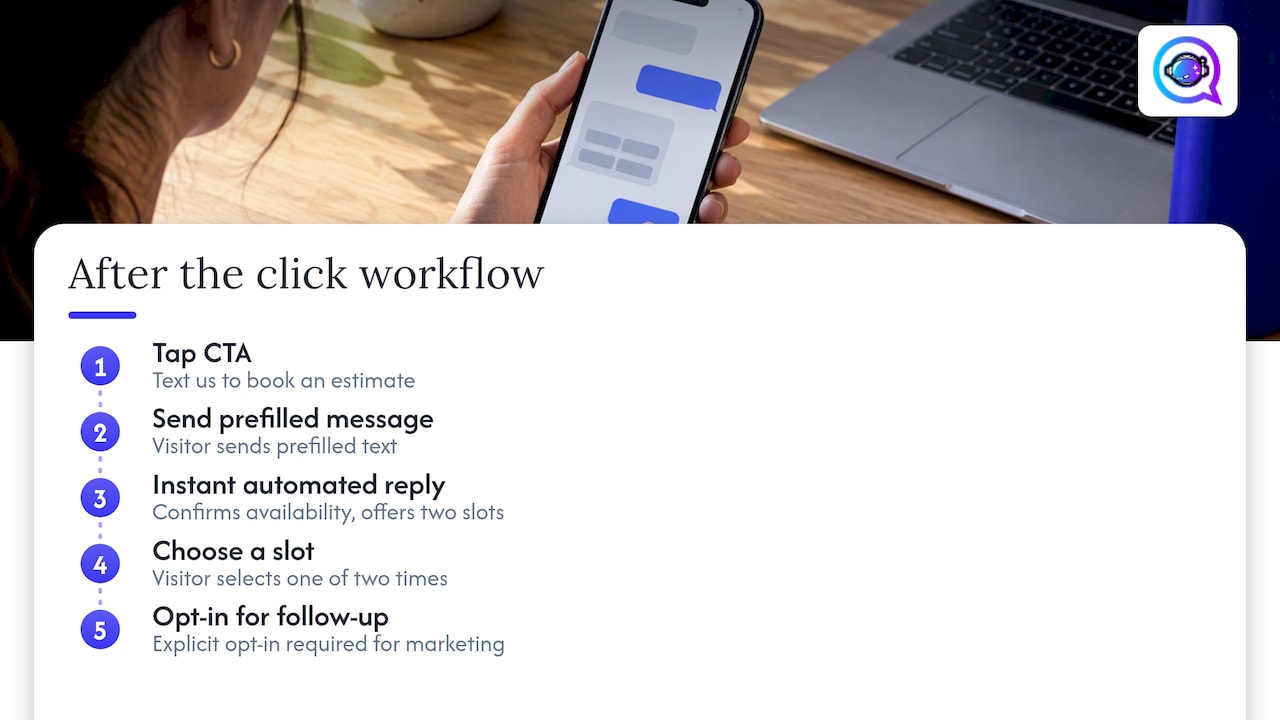
Here’s a workflow we see often: a visitor taps “Text us to book an estimate,” sends the prefilled message, and within seconds an automated reply confirms availability and offers two time slots. That speed is what turns a casual click into a booked appointment instead of an abandoned conversation. Some AI-powered tools offer voice-trained automated replies and integrations across many apps, though any recurring or marketing follow-up still needs explicit opt-in first.
Our take: the code is the easy five minutes
Most guides treat click-to-SMS as a code snippet problem, and that’s backwards. Copying an anchor tag takes five minutes. The part that actually determines whether this feature helps or hurts you is what happens after the tap: whether your prefilled text sets honest expectations, whether your disclosure makes future messaging clear, and whether you can prove consent if anyone ever asks, as a single tap does not imply consent for future messages.

We’d also push back on the instinct to prefill as much context as possible. A longer prefilled message feels helpful, but it often reads like a form letter, and some handlers truncate or mangle long encoded strings anyway. Shorter, more specific prefills convert better and break less.
The most overlooked piece is the gap between “the visitor texted us” and “the visitor opted into our marketing list.” Treating those as the same thing is the single most common compliance mistake we see on business websites, and it’s an easy one to avoid with a one-line disclosure and a documented opt-in step before any automated follow-up begins.
— Jamaal
Automating the follow-up without losing the personal touch
Once your click-to-text link is live, the real work is what happens in the minutes after someone taps it. We built Astreaux to handle that moment: instant, voice-matched replies, appointment scheduling, and consent-aware follow-up sequencing. Contractors can see how this plays out on our contractor landing page.
For teams managing leads across a mobile sales force, our AI lead outreach automation page shows how the same workflow scales. Book a demo to see it against your own lead volume.
FAQ
Is B2B texting legal?
Yes, B2B texting is legal in the United States, but it still falls under TCPA rules when messages are automated, recurring, or promotional. The FCC’s guidance requires prior express written consent for many marketing robotexts regardless of whether the recipient is a business or consumer.
How can I access my SMS messages from the web?
Most carriers and phone makers offer a web portal or desktop app (like Google Messages for web or Apple’s Messages on Mac) that syncs with your phone’s SMS app. These are device and carrier features rather than something a website’s click-to-text link controls directly.
How do I create a click-to-text link?
Use an HTML anchor with the sms: scheme and your phone number, such as <a href="sms:+15551234567">Text us</a>. To prefill a message, add a URL-encoded ?body= parameter, following the format shown in Google’s deep link documentation.
What is an SMS URL?
An SMS URL, or SMS URI, is a link that uses the sms: protocol scheme instead of http: to open a device’s messaging app rather than a webpage. The MDN URI scheme reference explains how schemes like this tell browsers which handler should process the link.
Does a click-to-text link count as marketing consent?
No, a single click to open a prefilled text draft is not the same as consent for ongoing marketing messages. FCC guidance distinguishes initiating a one-off conversation from the prior express written consent required for recurring marketing texts, so any follow-up campaign needs its own opt-in step.


