

Connect Web Forms to SMS: Quick Implementation Guide
The fastest way to connect web forms to SMS is a native plugin add-on for simple sites, a direct webhook to an SMS gateway like Twilio for reliability and control, or a no-code connector like Zapier when non-technical teams need quick, multi-app routing. Each path delivers admin alerts, user confirmations, OTPs, or booking confirmations the moment a form submits. The webhook route gives you the clearest visibility into delivery status (queued, delivered, or failed) and works with any phone number formatted to the E.164 standard.
Native add-on: fastest setup, works inside your existing form plugin
Webhook to Twilio/ClickSend/Vonage: best reliability, full delivery tracking
No-code (Zapier): quickest for non-developers connecting multiple apps
Roughly 70% of consumers prefer texting for time-sensitive updates over email or phone calls, which is why speed of setup matters as much as speed of delivery.
Key Takeaways
Connecting a web form to SMS works best through a webhook to a dedicated gateway when reliability matters, or a native add-on when speed of setup matters more than deep control.
Point | Details |
|---|---|
Pick your method by need | Native add-ons for speed, webhooks for control and tracking, no-code for quick multi-app routing. |
Validate every number | Format phone fields to E.164 before sending to prevent failed deliveries at the gateway. |
Track delivery status | Monitor queued, delivered, and failed states, and log failures instead of ignoring them. |
Watch message length | Keep texts under 160 characters per segment to avoid splitting and extra cost. |
Astreaux automates the whole loop | Astreaux maps form fields to instant SMS replies and booking workflows, with delivery tracking built in. |
Why Send SMS From Form Submissions?
SMS gets read faster than email, and for a lead or booking request, that speed decides whether you win the business or lose it to a competitor who called first. A form submission that only triggers an email can sit unread for hours; a text lands on a phone screen in seconds.
The core use cases repeat across industries:
Lead notifications to sales reps the instant a prospect submits a contact form
Booking confirmations and reminders for appointments, consultations, or service calls
OTPs and phone verification to confirm a real, reachable number before a lead enters your pipeline
Internal alerts routed to on-call staff or team numbers for urgent submissions
Platforms that report message status (queued, delivered, failed) give you a way to measure actual response-time improvement, not just whether a message was sent. That distinction becomes important once you’re troubleshooting a lead who says they “never got the text.”
Which Integration Method Should You Choose?
Choose a native add-on if you want speed and low maintenance. Choose a webhook if you need control, delivery tracking, and the ability to scale into more complex workflows. Choose a no-code connector if your team has zero developer time and needs to route form data to several apps at once.
Native add-ons plug directly into the form builder you already use. Gravity Forms connects straight to Twilio through its own add-on, supporting merge tags, conditional logic, and a test mode you can run before anything goes live. Contact Form 7 and WPForms reach similar functionality through the WPSMS plugin, which maps form fields into SMS content and supports gateways including Twilio, ClickSend, and Vonage (formerly Nexmo). Jotform offers its own Communication Integrations across several SMS providers, and Google Forms reaches SMS through the Forms Notifications add-on, which uses your own Twilio credentials.
Webhooks give you the most control. You configure the form to POST a payload to your gateway or middleware, which then triggers the SMS API call. This is where FormGent’s custom-gateway mode or SpringEdge’s Zoho Forms webhook setup earn their keep, since both expose the raw request and let you log every step.

No-code connectors like Zapier sit in the middle: fast to configure, but a “successful” Zapier action only confirms the message was queued, not that it reached the recipient’s phone.
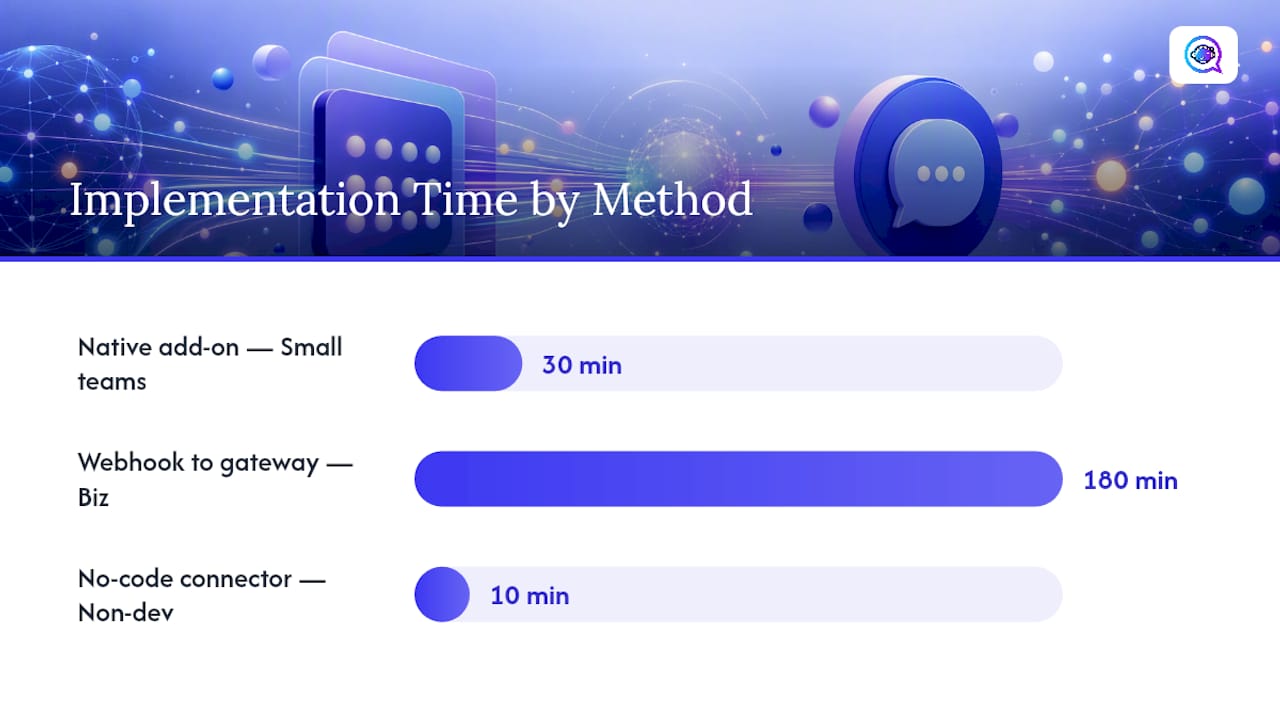
Approach | Time to implement | Maintenance effort | Delivery tracking | Best for |
|---|---|---|---|---|
Native add-on | Minutes to an hour | Low | Basic (send confirmation) | Small teams, standard forms |
Webhook to SMS gateway | A few hours | Moderate | Full (queued/delivered/failed) | Businesses needing reliability |
No-code connector | Minutes | Low | Limited (queued only) | Non-technical teams, multi-app routing |
Custom code | Days | High | Full, with custom logic | High-volume or bespoke workflows |
Pro Tip: If your business depends on immediate follow-up (a hot real estate lead, a same-day service call), don’t settle for “message sent.” Insist on a method that reports delivery status, so a failed text triggers a fallback call instead of a lead going cold silently.
How Do You Set Up Form-to-SMS Step by Step?
Here’s a 10-step checklist you can follow yourself or hand to a developer:
Add a phone field to your form and validate it against E.164 format (for example, +14155552671) to prevent malformed numbers from failing at the gateway.
Choose your SMS gateway and confirm you have both test and live API keys.
Map form fields (name, phone, form ID, message content) to the variables your SMS template expects.
Set conditional logic so only qualifying submissions (a specific service type or budget range) trigger a text.
Secure your webhook endpoint with an HMAC signature or secret token so only your form platform can trigger it.
Build retry logic with exponential backoff for temporary gateway errors, and log every failed attempt.
Enable delivery status callbacks so your system records queued, delivered, or failed for every message.
Use sandbox or test API keys first, sending to a test number you control.
Run several test submissions, checking both the payload sent and the message received.
Go live, then monitor your monthly SMS volume and cost against your estimate.
Estimating cost before you go live avoids surprises on your first invoice:
Pro Tip: Add an input mask to your phone field so users physically can’t submit a number in the wrong format. It’s a five-minute fix that eliminates one of the most common causes of failed deliveries.
What Does a Webhook-to-SMS Payload Look Like?
Below is a minimal webhook to Twilio payload flow you can copy and test in minutes. When a form submits, it typically POSTs a JSON payload like this to your webhook endpoint:
Your server then relays that data to Twilio’s Messages API, typically as an HTTP POST authenticated with your Account SID and Auth Token:
To: the validated E.164 number from the payloadFrom: your Twilio sender numberBody: your composed message, pulled from the mapped fields
Platforms like FormGent handle this exact mapping with placeholders such as {{to}} and {{message}}, which is worth studying even if you’re building your own handler. Keep messages within 160 characters per segment; going over that splits the text into multiple segments and multiplies your cost per send.
Payload field | Maps to |
|---|---|
phone | Twilio “To” number (E.164 validated) |
message | Twilio “Body” text |
form_id | Internal logging/routing tag |
Pro Tip: Always test with Twilio’s sandbox credentials first, and check the delivery status callback on every test send. A message that shows “queued” but never moves to “delivered” usually points to a carrier filtering issue, not a code bug.
How Do You Keep Messages Compliant and Deliverable?
Get opt-in consent before texting anyone, validate every number to E.164 before it enters your system, and monitor delivery status on every message you send. Skipping any of these three tends to be the reason messages silently vanish.
Add clear opt-in language to your form (“By submitting, you agree to receive SMS updates about your request”)
Register for A2P 10DLC compliance if you’re sending business SMS in the U.S. at volume, which affects deliverability and throughput
Treat “queued” and “delivered” as different states: queued means your gateway accepted the message, delivered means the carrier confirmed it reached the device
Log every failed message and alert your team, don’t let failures disappear into a dashboard nobody checks
Best practice on message content: keep transactional texts short, use a template rather than freeform copy, and shorten any links. If a message fails due to a transient carrier error, retry with backoff rather than firing three identical texts in ten seconds. Businesses running SMS reminders at scale, including those in appointment-heavy industries, lean on these habits specifically because a missed delivery on a booking reminder tends to show up later as a no-show.
DIY Webhook or Managed Platform: Which Fits Your Business?
A DIY webhook makes sense if your volume is low and your flow is simple: one form, one alert, one team. Once you’re juggling multiple lead sources, after-hours response gaps, and the need for actual conversation (not just a one-way alert), the calculus changes.
A managed, AI-driven responder cuts the time between “lead submits” and “lead gets a personalized reply” down to seconds, consistently, without someone manually triaging a text thread at 9 PM. That consistency, not the SMS itself, is what actually moves conversion numbers.
Turn Form Submissions Into Booked Appointments, Automatically
A webhook gets you a text message. Astreaux gets you a conversation, and eventually a booked appointment, without anyone on your team touching a phone. When a lead submits your form, Astreaux maps the phone number, sends an instant personalized SMS reply in your business’s own voice, and keeps the conversation going until the prospect books a time slot.

Beyond instant replies, Astreaux tracks delivery and message status automatically, so you’re never guessing whether a lead actually received a follow-up. It connects with more than 7,000 apps, which means your existing form builder, whether that’s Gravity Forms, Jotform, or a custom site, plugs in without a separate webhook project. Contractors, mortgage brokers, real estate agents, and therapists use it specifically to close the gap between form submission and booked appointment. If you want to see how it handles your specific lead flow, try Astreaux or check the contractor-specific setup if that’s your industry.
Sources
How to send WordPress SMS form notifications (Gravity Forms)
Send SMS messages from Google Form responses - Forms Notifications
FAQ
What’s the fastest way to connect a web form to SMS?
For most sites, a native plugin add-on (like Gravity Forms’ Twilio Add-On) is fastest to set up; a webhook to a gateway offers more control and better delivery tracking.
Do I need Twilio specifically to send SMS from a form?
No. Twilio is the most widely documented gateway, but ClickSend, Vonage, and Firebase all support similar webhook-based integrations.
What does “queued” mean versus “delivered”?
Queued means your gateway accepted the message for sending; delivered means the carrier confirmed it reached the device, so treat them as separate signals when troubleshooting.
How do I prevent failed SMS deliveries from bad phone numbers?
Validate every phone field to E.164 format before submission and use an input mask, which eliminates the most common cause of failed sends.
Can Astreaux handle form-to-SMS automatically without a developer?
Yes. Astreaux maps form fields to instant, personalized SMS replies and booking workflows out of the box, without requiring a custom webhook build.


